# On-chain Tasks

**Step-by-Step Guide**

There are 6 different on-chain tasks that you can implement on Tide:

* NFT Holding
* Provide Liquidity
* Track On-Chain Event
* Minimum Token Balance
* Minimum number of transactions in a protocol
* Track Advanced On-Chain Event

**NFT Holding:** \
\
You may decide to gate the access to users owning a specific NFT collection.\
With Tide, you just need to look up the NFT contract address on OpenSea and paste it on Tide. It is also necessary to:

* Select the network on which the NFT contract has been deployed
* Add a brief task description&#x20;
* Include a useful link that will be associated with the description text (i.e. Opensea Collection page link)

<figure><img src="/files/665Sw32lYUH9oCVGq2O5" alt=""><figcaption><p>E.g. Require users to hold a specific NFT to complete the campaign</p></figcaption></figure>

**Provide Liquidity:**&#x20;

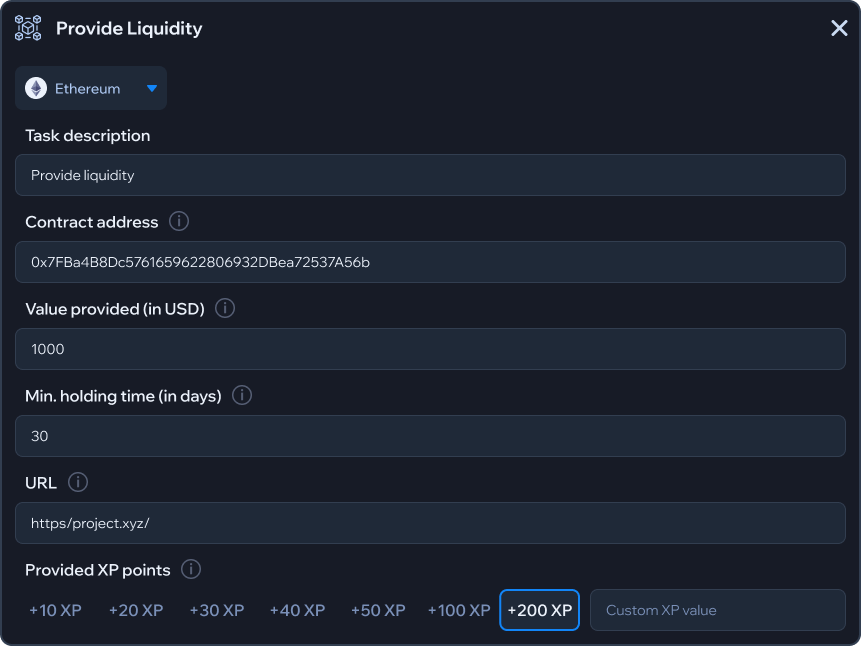
With our “Provide Liquidity” task, you can monitor liquidity deposits without effort. Again the information needed are just a few:

* The pool contract address&#x20;
* The dollar amount users should deposit
* The number of days users can’t withdraw
* Network, Task Description, Website URL

For example, you can require users to deposit 1000$ for 30 days with a few clicks.

<figure><img src="/files/dNlbTwXZQIPiy38x7j6e" alt=""><figcaption><p>E.g., Deposit 1000$ for 30 days</p></figcaption></figure>

**Track on-chain events:**&#x20;

With Tide, it's possible to track any on-chain event. For example, derivate protocols can ask users to open 10X leverage positions.

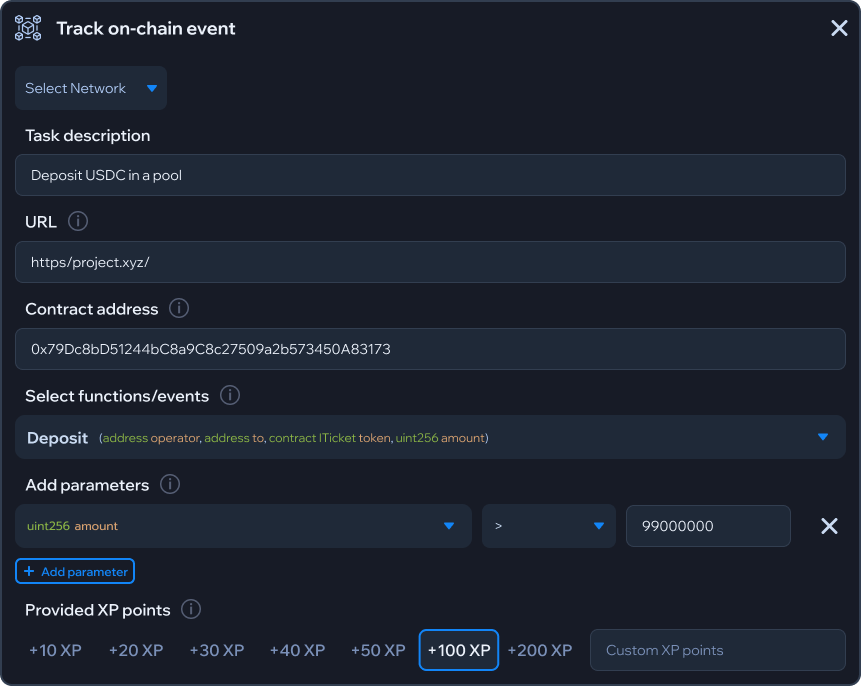
The “Track on-chain event” is the task for monitoring interactions with any event associated with your dApp smart contracts, and it’s even possible to specify event parameters.

From a technical side, the only information needed on Tide to monitor general on-chain actions are:

* The contract address
* The associated event you want to track
* Optionally, you can add parameters to specify details related to the selected event
* Network, Task Description, Website URL

<figure><img src="/files/zW2DOevIkIqRlWi9JhdA" alt=""><figcaption><p>E.g. Deposit 99 or more USDC in a Pool</p></figcaption></figure>

**Minimum Token Balance:**

Require users to hold a minimum balance of a specific token to participate in a campaign.

The only fields to fill out are:

* ERC-20 token contract address
* Minimum token balance users need to hold
* Network

<figure><img src="/files/JK931oBHFfEdrrgGZbsK" alt=""><figcaption><p>E.g. Hold at least 100 USDC</p></figcaption></figure>

**Minimum number of transactions in a protocol:**

Require users to perform a minimum amount of transactions with a specific smart contract

The necessary information are :

* Smart contract address
* Minimum transaction count
* Network, Task Description, Website URL

<figure><img src="/files/G9rCIHugI4PVV8lEukeA" alt=""><figcaption><p>E.g. Perform at least 10 transactions in a protocol</p></figcaption></figure>

**Track advanced on-chain events:**

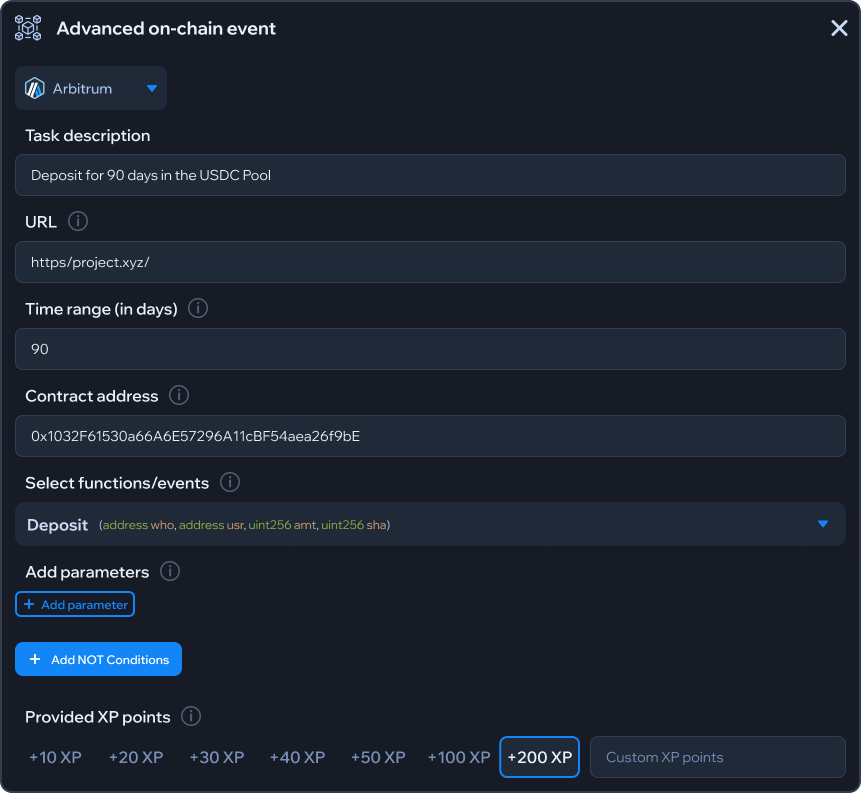
With the advanced on-chain events features, it’s possible to add time constraints to general on-chain tasks. For example, lending protocols could easily require users to deposit funds in a pool and not withdraw for a month.

You can check the information to fill on Tide to implement this task in the picture below:&#x20;

<figure><img src="/files/A7YdOYRyDAiIBMYPSiON" alt=""><figcaption></figcaption></figure>


---

# Agent Instructions: Querying This Documentation

If you need additional information that is not directly available in this page, you can query the documentation dynamically by asking a question.

Perform an HTTP GET request on the current page URL with the `ask` query parameter:

```
GET https://fiveelementslabs.gitbook.io/tide/projects/campaigns/create-a-campaign/on-chain-tasks.md?ask=<question>
```

The question should be specific, self-contained, and written in natural language.
The response will contain a direct answer to the question and relevant excerpts and sources from the documentation.

Use this mechanism when the answer is not explicitly present in the current page, you need clarification or additional context, or you want to retrieve related documentation sections.